Stash-boxes
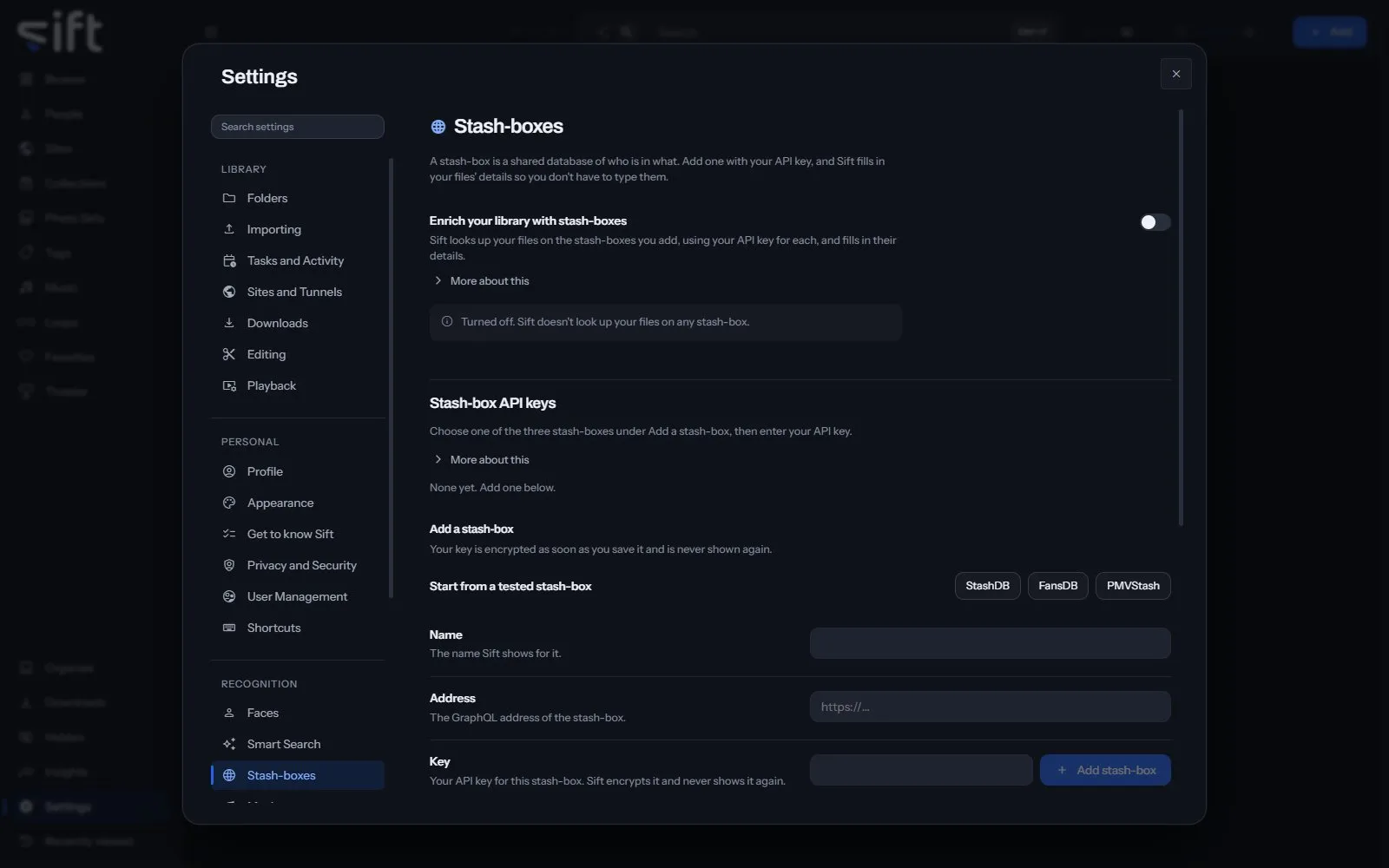
A stash-box is a shared database of who is in what, and Sift fills in your files’ details from the ones you add. To open its settings, go to Settings > Stash-boxes.
Come here to add a stash-box with your API key and choose what Sift does with the details it finds. Sift offers three tested stash-boxes: StashDB, FansDB and PMVStash.
On this pane
Section titled “On this pane”The first row has no heading: the switch that turns enrichment on. Then the pane draws these groups, in this order:
- Stash-box API keys: the stash-boxes you added. Add a stash-box takes a Name, an Address and your Key, or Start from a tested stash-box fills in the first two. Then choose Add stash-box.
- Stash-box search: Search by name searches every stash-box that’s turned on. Nothing is saved to your library.
- Stash-box fields: what Sift does when a stash-box has a value for a field. For every field sets one answer, and Choose for each field opens every field with Edit.
Your key is encrypted as soon as you save it, and Sift never shows it again.
Every setting
Section titled “Every setting”Enrich your library with stash-boxes
Section titled “Enrich your library with stash-boxes”Sift looks up your files on the stash-boxes you add, using your API key for each, and fills in their details.
A stash-box is a shared database of details about adult videos and the people in them. Sift sends each file’s fingerprint and adds the details of any match to your library. Your files are never sent.
- Path: Settings > Stash-boxes > Enrich your library with stash-boxes
- Default: Off
- Who sets it: an admin, for everyone on this Sift
Confirm exact matches automatically
Section titled “Confirm exact matches automatically”When an automatic lookup finds an exact match, Sift adds the details right away. Other matches wait in Organize.
Running Auto-enrich yourself always confirms exact matches, because you asked for it. This decides only for lookups Sift starts by itself, such as for new files. Other matches wait in Organize either way.
- Path: Settings > Stash-boxes > Confirm exact matches automatically
- Default: On
- Who sets it: an admin, for everyone on this Sift
Auto-enrich using
Section titled “Auto-enrich using”The stash-box Sift’s automatic lookups use, and the one Auto-enrich uses when you don’t choose one.
Every stash-box you add stays on, and you can still search any of them yourself.
- Path: Settings > Stash-boxes > Auto-enrich using
- Default: All stash-boxes
- Choices: All stash-boxes, FansDB, PMVStash, StashDB
- Who sets it: an admin, for everyone on this Sift
Allow lengths to differ by
Section titled “Allow lengths to differ by”Two copies of the same video run for about the same time.
Sift ignores a match whose length differs by more than this, so a different cut of the same video isn’t taken for yours.
- Path: Settings > Stash-boxes > Allow lengths to differ by
- Default: 10 sec
- Range: 0 to 600 sec
- Who sets it: an admin, for everyone on this Sift
Create new people
Section titled “Create new people”When off, people a stash-box names that your library doesn’t have are skipped.
Applies only to automatic lookups and to Auto-enrich. What you confirm yourself always creates what you select.
- Path: Settings > Stash-boxes > Create new people
- Default: On
- Who sets it: an admin, for everyone on this Sift
Create new Sites
Section titled “Create new Sites”When off, Sites a stash-box names that your library doesn’t have are skipped.
Applies only to automatic lookups and to Auto-enrich. What you confirm yourself always creates what you select.
- Path: Settings > Stash-boxes > Create new Sites
- Default: On
- Who sets it: an admin, for everyone on this Sift
Create new tags
Section titled “Create new tags”When off, tags a stash-box names that your library doesn’t have are skipped.
Applies only to automatic lookups and to Auto-enrich. What you confirm yourself always creates what you select.
- Path: Settings > Stash-boxes > Create new tags
- Default: On
- Who sets it: an admin, for everyone on this Sift
What Sift does when a stash-box has this for a person.
- Path: Settings > Stash-boxes > Name
- Default: Fill in what is missing
- Choices: Leave alone, Fill in what is missing, Replace what is there
- Who sets it: an admin, for everyone on this Sift
Aliases
Section titled “Aliases”What Sift does when a stash-box has this for a person.
- Path: Settings > Stash-boxes > Aliases
- Default: Fill in what is missing
- Choices: Leave alone, Fill in what is missing, Replace what is there
- Who sets it: an admin, for everyone on this Sift
Details
Section titled “Details”What Sift does when a stash-box has this for a person.
- Path: Settings > Stash-boxes > Details
- Default: Fill in what is missing
- Choices: Leave alone, Fill in what is missing, Replace what is there
- Who sets it: an admin, for everyone on this Sift
What Sift does when a stash-box has this for a person.
- Path: Settings > Stash-boxes > Links
- Default: Fill in what is missing
- Choices: Leave alone, Fill in what is missing, Replace what is there
- Who sets it: an admin, for everyone on this Sift
Usernames
Section titled “Usernames”What Sift does when a stash-box has this for a person.
- Path: Settings > Stash-boxes > Usernames
- Default: Fill in what is missing
- Choices: Leave alone, Fill in what is missing, Replace what is there
- Who sets it: an admin, for everyone on this Sift
What Sift does when a stash-box has this for a person.
- Path: Settings > Stash-boxes > Tags
- Default: Fill in what is missing
- Choices: Leave alone, Fill in what is missing, Replace what is there
- Who sets it: an admin, for everyone on this Sift
Birthdate
Section titled “Birthdate”What Sift does when a stash-box has this for a person.
- Path: Settings > Stash-boxes > Birthdate
- Default: Fill in what is missing
- Choices: Leave alone, Fill in what is missing, Replace what is there
- Who sets it: an admin, for everyone on this Sift
Nationality
Section titled “Nationality”What Sift does when a stash-box has this for a person.
- Path: Settings > Stash-boxes > Nationality
- Default: Fill in what is missing
- Choices: Leave alone, Fill in what is missing, Replace what is there
- Who sets it: an admin, for everyone on this Sift
Hair color
Section titled “Hair color”What Sift does when a stash-box has this for a person.
- Path: Settings > Stash-boxes > Hair color
- Default: Fill in what is missing
- Choices: Leave alone, Fill in what is missing, Replace what is there
- Who sets it: an admin, for everyone on this Sift
Measurements
Section titled “Measurements”What Sift does when a stash-box has this for a person.
- Path: Settings > Stash-boxes > Measurements
- Default: Fill in what is missing
- Choices: Leave alone, Fill in what is missing, Replace what is there
- Who sets it: an admin, for everyone on this Sift
Disambiguation
Section titled “Disambiguation”What Sift does when a stash-box has this for a person.
- Path: Settings > Stash-boxes > Disambiguation
- Default: Fill in what is missing
- Choices: Leave alone, Fill in what is missing, Replace what is there
- Who sets it: an admin, for everyone on this Sift
Gender
Section titled “Gender”What Sift does when a stash-box has this for a person.
- Path: Settings > Stash-boxes > Gender
- Default: Fill in what is missing
- Choices: Leave alone, Fill in what is missing, Replace what is there
- Who sets it: an admin, for everyone on this Sift
Ethnicity
Section titled “Ethnicity”What Sift does when a stash-box has this for a person.
- Path: Settings > Stash-boxes > Ethnicity
- Default: Fill in what is missing
- Choices: Leave alone, Fill in what is missing, Replace what is there
- Who sets it: an admin, for everyone on this Sift
Eye color
Section titled “Eye color”What Sift does when a stash-box has this for a person.
- Path: Settings > Stash-boxes > Eye color
- Default: Fill in what is missing
- Choices: Leave alone, Fill in what is missing, Replace what is there
- Who sets it: an admin, for everyone on this Sift
Height
Section titled “Height”What Sift does when a stash-box has this for a person.
- Path: Settings > Stash-boxes > Height
- Default: Fill in what is missing
- Choices: Leave alone, Fill in what is missing, Replace what is there
- Who sets it: an admin, for everyone on this Sift
Breast type
Section titled “Breast type”What Sift does when a stash-box has this for a person.
- Path: Settings > Stash-boxes > Breast type
- Default: Fill in what is missing
- Choices: Leave alone, Fill in what is missing, Replace what is there
- Who sets it: an admin, for everyone on this Sift
Career start
Section titled “Career start”What Sift does when a stash-box has this for a person.
- Path: Settings > Stash-boxes > Career start
- Default: Fill in what is missing
- Choices: Leave alone, Fill in what is missing, Replace what is there
- Who sets it: an admin, for everyone on this Sift
Career end
Section titled “Career end”What Sift does when a stash-box has this for a person.
- Path: Settings > Stash-boxes > Career end
- Default: Fill in what is missing
- Choices: Leave alone, Fill in what is missing, Replace what is there
- Who sets it: an admin, for everyone on this Sift
Tattoos
Section titled “Tattoos”What Sift does when a stash-box has this for a person.
- Path: Settings > Stash-boxes > Tattoos
- Default: Fill in what is missing
- Choices: Leave alone, Fill in what is missing, Replace what is there
- Who sets it: an admin, for everyone on this Sift
Piercings
Section titled “Piercings”What Sift does when a stash-box has this for a person.
- Path: Settings > Stash-boxes > Piercings
- Default: Fill in what is missing
- Choices: Leave alone, Fill in what is missing, Replace what is there
- Who sets it: an admin, for everyone on this Sift
What Sift does when a stash-box has this for a Site.
- Path: Settings > Stash-boxes > Name
- Default: Fill in what is missing
- Choices: Leave alone, Fill in what is missing, Replace what is there
- Who sets it: an admin, for everyone on this Sift
What Sift does when a stash-box has this for a Site.
- Path: Settings > Stash-boxes > Links
- Default: Fill in what is missing
- Choices: Leave alone, Fill in what is missing, Replace what is there
- Who sets it: an admin, for everyone on this Sift
Details
Section titled “Details”What Sift does when a stash-box has this for a Site.
- Path: Settings > Stash-boxes > Details
- Default: Fill in what is missing
- Choices: Leave alone, Fill in what is missing, Replace what is there
- Who sets it: an admin, for everyone on this Sift
What Sift does when a stash-box has this for a Site.
- Path: Settings > Stash-boxes > Tags
- Default: Fill in what is missing
- Choices: Leave alone, Fill in what is missing, Replace what is there
- Who sets it: an admin, for everyone on this Sift
Aliases
Section titled “Aliases”What Sift does when a stash-box has this for a Site.
- Path: Settings > Stash-boxes > Aliases
- Default: Fill in what is missing
- Choices: Leave alone, Fill in what is missing, Replace what is there
- Who sets it: an admin, for everyone on this Sift
Part of
Section titled “Part of”What Sift does when a stash-box has this for a Site.
- Path: Settings > Stash-boxes > Part of
- Default: Fill in what is missing
- Choices: Leave alone, Fill in what is missing, Replace what is there
- Who sets it: an admin, for everyone on this Sift
Aliases
Section titled “Aliases”What Sift does when a stash-box has this for a tag.
- Path: Settings > Stash-boxes > Aliases
- Default: Fill in what is missing
- Choices: Leave alone, Fill in what is missing, Replace what is there
- Who sets it: an admin, for everyone on this Sift
Category
Section titled “Category”What Sift does when a stash-box has this for a tag.
- Path: Settings > Stash-boxes > Category
- Default: Fill in what is missing
- Choices: Leave alone, Fill in what is missing, Replace what is there
- Who sets it: an admin, for everyone on this Sift
Description
Section titled “Description”What Sift does when a stash-box has this for a tag.
- Path: Settings > Stash-boxes > Description
- Default: Fill in what is missing
- Choices: Leave alone, Fill in what is missing, Replace what is there
- Who sets it: an admin, for everyone on this Sift
What Sift does when a stash-box has this for a file.
- Path: Settings > Stash-boxes > Title
- Default: Fill in what is missing
- Choices: Leave alone, Fill in what is missing, Replace what is there
- Who sets it: an admin, for everyone on this Sift
Released
Section titled “Released”What Sift does when a stash-box has this for a file.
- Path: Settings > Stash-boxes > Released
- Default: Fill in what is missing
- Choices: Leave alone, Fill in what is missing, Replace what is there
- Who sets it: an admin, for everyone on this Sift
Details
Section titled “Details”What Sift does when a stash-box has this for a file.
- Path: Settings > Stash-boxes > Details
- Default: Fill in what is missing
- Choices: Leave alone, Fill in what is missing, Replace what is there
- Who sets it: an admin, for everyone on this Sift
What Sift does when a stash-box has this for a file.
- Path: Settings > Stash-boxes > Links
- Default: Fill in what is missing
- Choices: Leave alone, Fill in what is missing, Replace what is there
- Who sets it: an admin, for everyone on this Sift
Shot on
Section titled “Shot on”What Sift does when a stash-box has this for a file.
- Path: Settings > Stash-boxes > Shot on
- Default: Fill in what is missing
- Choices: Leave alone, Fill in what is missing, Replace what is there
- Who sets it: an admin, for everyone on this Sift
Site code
Section titled “Site code”What Sift does when a stash-box has this for a file.
- Path: Settings > Stash-boxes > Site code
- Default: Fill in what is missing
- Choices: Leave alone, Fill in what is missing, Replace what is there
- Who sets it: an admin, for everyone on this Sift
What Sift does when a stash-box has this for a file.
- Path: Settings > Stash-boxes > Music
- Default: Fill in what is missing
- Choices: Leave alone, Fill in what is missing, Replace what is there
- Who sets it: an admin, for everyone on this Sift
Who is in this
Section titled “Who is in this”What Sift does when a stash-box has this for a file.
- Path: Settings > Stash-boxes > Who is in this
- Default: Fill in what is missing
- Choices: Leave alone, Fill in what is missing, Replace what is there
- Who sets it: an admin, for everyone on this Sift
What Sift does when a stash-box has this for a file.
- Path: Settings > Stash-boxes > Tags
- Default: Fill in what is missing
- Choices: Leave alone, Fill in what is missing, Replace what is there
- Who sets it: an admin, for everyone on this Sift
What Sift does when a stash-box has this for a file.
- Path: Settings > Stash-boxes > Site
- Default: Fill in what is missing
- Choices: Leave alone, Fill in what is missing, Replace what is there
- Who sets it: an admin, for everyone on this Sift
Usernames
Section titled “Usernames”What Sift does when a stash-box has this for a file.
- Path: Settings > Stash-boxes > Usernames
- Default: Fill in what is missing
- Choices: Leave alone, Fill in what is missing, Replace what is there
- Who sets it: an admin, for everyone on this Sift
Who made it
Section titled “Who made it”What Sift does when a stash-box has this for a file.
- Path: Settings > Stash-boxes > Who made it
- Default: Fill in what is missing
- Choices: Leave alone, Fill in what is missing, Replace what is there
- Who sets it: an admin, for everyone on this Sift