Appearance
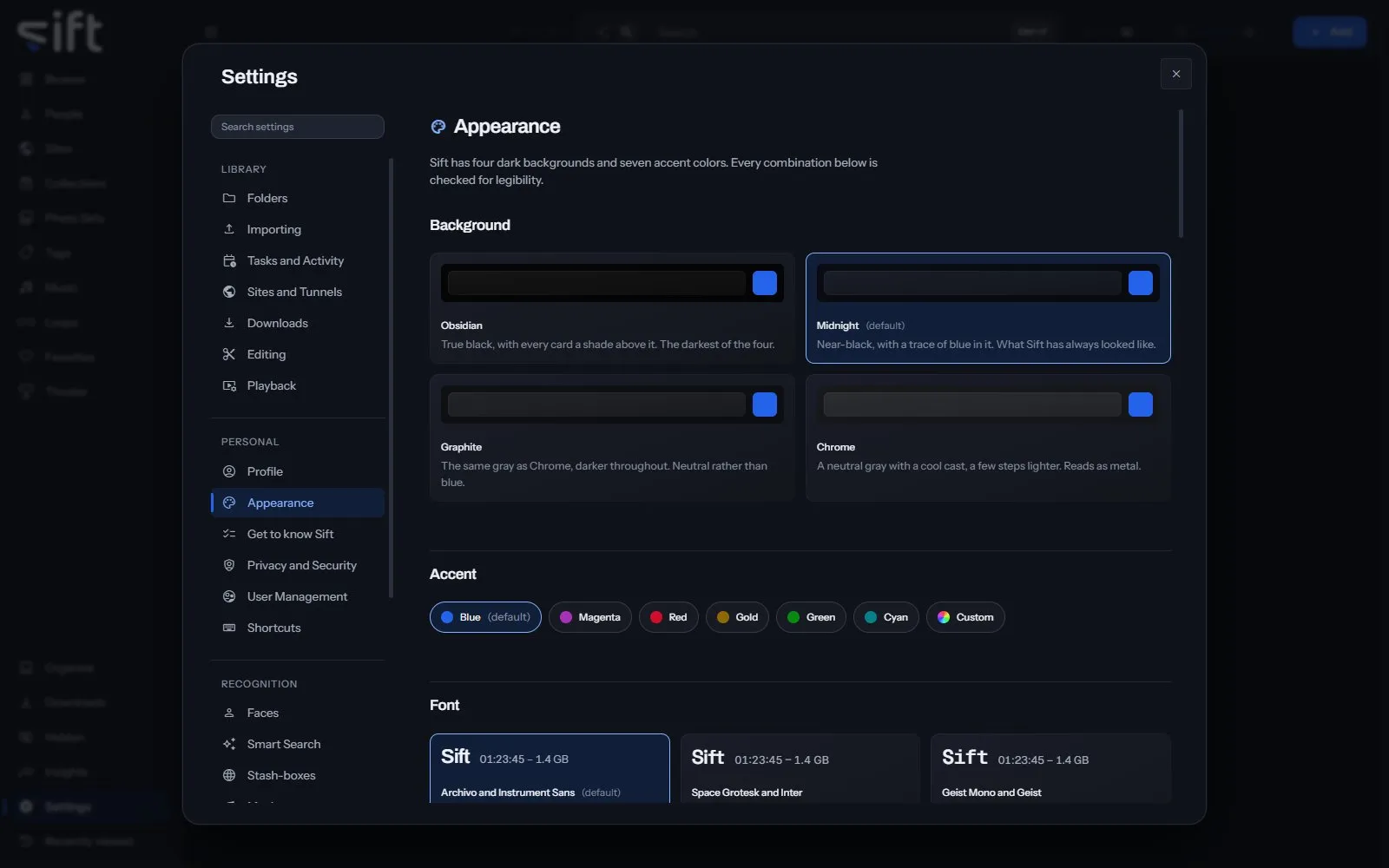
Appearance is where you choose how Sift looks to you: its colors, fonts, ratings, clock and the marks on a tile. To open it, go to Settings > Appearance.
Come here to change the background or accent color, or to choose which pages the sidebar shows. Each User chooses for themselves.
On this pane
Section titled “On this pane”The pane draws these groups, in this order:
- Background: four dark backgrounds, Obsidian, Midnight, Graphite and Chrome.
- Accent: seven accent colors and Custom.
- Font: six font pairings, then Main and Secondary to choose each font yourself.
- Ratings: Five stars or Ten stars.
- Time: a 12-hour or 24-hour clock.
- Motion: how much Sift animates. It’s saved in this browser only.
- People details: how much of a person’s record you see, and the units heights are shown in.
- Marks on a tile: when each mark appears. Select a mark on the picture, then choose Always on the tile, Only when you point at it or Never.
- Sidebar: which pages the sidebar shows, and their order. Drag a row by its grip to move it. It’s saved in this browser only.
Rows the pane draws by hand
Section titled “Rows the pane draws by hand”- Movement: Full motion, Follow Windows or Reduced motion, for this browser.
- Reset the sidebar: Reset shows every page again, in the order Sift started with.
Every setting
Section titled “Every setting”Background
Section titled “Background”The color everything else sits on.
Obsidian is true black. Midnight is the near-black Sift has always used. Graphite and Chrome are the same neutral gray, one darker and one a little lighter.
- Path: Settings > Appearance > Background
- Default: Midnight
- Choices: Obsidian, Midnight, Graphite, Chrome
- Who sets it: each User, for themselves
Accent color
Section titled “Accent color”The color that marks what is selected, focused or playing.
The six named colors have the same brightness, so none is harder to see. Custom starts from a color you choose and is adjusted to stay just as legible.
- Path: Settings > Appearance > Accent color
- Default: Blue
- Choices: Blue, Magenta, Red, Gold, Green, Cyan, Custom
- Who sets it: each User, for themselves
Custom accent color
Section titled “Custom accent color”The color a custom accent starts from, written as # and six digits. Used only while Accent color is Custom.
- Path: Settings > Appearance > Custom accent color
- Default: #2563eb
- Who sets it: each User, for themselves
Saved accent colors
Section titled “Saved accent colors”Up to ten colors of your own, kept under the six named accents. Press one to wear it as your custom accent.
- Path: Settings > Appearance > Saved accent colors
- Default: empty
- Who sets it: each User, for themselves
Main font
Section titled “Main font”The typeface headings and numbers are set in. The sizes never change, only the shapes of the letters.
- Path: Settings > Appearance > Main font
- Default: Archivo
- Choices: Archivo, Space Grotesk, Geist Mono, Manrope, JetBrains Mono
- Who sets it: each User, for themselves
Secondary font
Section titled “Secondary font”The typeface everything you read is set in: rows, help, the words on a button. Each of the six pairings sets both fonts, and you can change either one by itself.
- Path: Settings > Appearance > Secondary font
- Default: Instrument Sans
- Choices: Instrument Sans, Inter, Geist, Public Sans, Sora, DM Sans
- Who sets it: each User, for themselves
How Sift writes a time of day, such as when a file was added or a task last ran.
- Path: Settings > Appearance > Clock
- Default: 12-hour
- Choices: 12-hour, 24-hour
- Who sets it: each User, for themselves
Times watched
Section titled “Times watched”An eye and a number, on anything you have opened at least once.
- Path: Settings > Appearance > Times watched
- Default: Only when I point at it
- Choices: Always, Only when I point at it, Never
- Who sets it: each User, for themselves
O counter
Section titled “O counter”A drop and a number, on anything you have pressed the O counter on.
- Path: Settings > Appearance > O counter
- Default: Only when I point at it
- Choices: Always, Only when I point at it, Never
- Who sets it: each User, for themselves
Pinned
Section titled “Pinned”A pin, on anything you have put at the top of a wall.
- Path: Settings > Appearance > Pinned
- Default: Only when I point at it
- Choices: Always, Only when I point at it, Never
- Who sets it: each User, for themselves
Shared or private
Section titled “Shared or private”A badge on anything you have shared with a guest or kept private from one. It shows that a choice was made, never who it was about.
- Path: Settings > Appearance > Shared or private
- Default: Only when I point at it
- Choices: Always, Only when I point at it, Never
- Who sets it: each User, for themselves
Hidden
Section titled “Hidden”A crossed-out eye, on anything you keep out of the ordinary view.
- Path: Settings > Appearance > Hidden
- Default: Only when I point at it
- Choices: Always, Only when I point at it, Never
- Who sets it: each User, for themselves
The heart you press to like a file. When off, you can still like a file from the file itself or from its menu.
- Path: Settings > Appearance > Heart
- Default: Only when I point at it
- Choices: Always, Only when I point at it, Never
- Who sets it: each User, for themselves
Rating
Section titled “Rating”The rating you gave a file, beside the heart. You rate a file on the file itself.
- Path: Settings > Appearance > Rating
- Default: Only when I point at it
- Choices: Always, Only when I point at it, Never
- Who sets it: each User, for themselves
The word GIF
Section titled “The word GIF”In the corner of a looping picture, where a video shows its length.
- Path: Settings > Appearance > The word GIF
- Default: Always
- Choices: Always, Only when I point at it, Never
- Who sets it: each User, for themselves

Duration
Section titled “Duration”The clock in the bottom corner of a video.
- Path: Settings > Appearance > Duration
- Default: Always
- Choices: Always, Only when I point at it, Never
- Who sets it: each User, for themselves
Rating scale
Section titled “Rating scale”How many stars a rating shows.
There are no half stars, and ratings you already gave keep their meaning.
- Path: Settings > Appearance > Rating scale
- Default: Five stars
- Choices: Five stars, Ten stars
- Who sets it: each User, for themselves
Show every field on a record
Section titled “Show every field on a record”When off, a record shows only its main fields.
The extra fields are ones only a stash-box fills in, like eye color and height. Nothing is saved or deleted either way.
- Path: Settings > Appearance > Show every field on a record
- Default: On
- Who sets it: each User, for themselves
How heights are shown. Sift stores them in centimeters either way.
- Path: Settings > Appearance > Units
- Default: Feet and inches
- Choices: Centimeters, Feet and inches
- Who sets it: each User, for themselves